MarsEdit – Blog Client

Posting a blog entry can be a little too complicated, especially if you want to include some formatting, a table, or a photo. The built-in editors have gotten friendlier, but you still have to deal with some technical issues.

That’s where a third-party blog client comes in like MarsEdit (which I am typing in at the moment.) I also used to use Ecto but quit a while back. Apparently Ecto was acquired and is now “abandoned-ware.”

I wondered if Mom and Carol would find using a blog client easier than having to remember how to login, write an article and publish it.

I can already tell this would help Carol, because you don’t have to remember to double-return between paragraphs. Now…. let me test a photo. I see a little button at the top in the toolbar called Media. I just created a snapshot of the toolbar. Let’s see i I can put it in this article by clicking on Media:

mars-edit-toolbar.png

Well that was easy. I just chose the toolbox image I had saved on my desktop. There was a field I had to fill out called “Section”. Not sure what that was for, I typed “2010”. I’m going to hit publish now and see where that picture goes. Then I’ll come back and edit this some more and publish again.

Be right back…. clicking on that “Send to Blog” button up there….

OK… I’m back. That worked great, although I can see I had several type-o’s. The errors were spelled correctly, so MarsEdit didn’t help me avoid that.

Looks like the “Section” means what directory do you want the image stored in. I’ve started storing images in a root directory with the year. That seems like a good way to keep a bunch of photos and images grouped instead of having them all go in a bunch of spread out months. So the path to the image above is: /2010/mars-edit-toolbar.png.

I see I can also insert an image by using a link to somewhere else on the internet. Let’s test an image from my Skitch library. Clicking on Media again…

Well it wasn’t there. Right-clicking and choosing Format… Image from link…

20100310-xuwc8qk98e1g7p989gkhbbdwu6.medium.jpg

That worked. Carl from “Up” showed up. I don’t see how I can make him smaller and have a pop-up though. So Carl is not going to end up being an image on my blog, rather I am just showing an image from another server, in this case Skitch.com.

And here’s one from facebook:

41649_5617390_8125240_n.jpg

So that’s MarsEdit. But it runs on a Mac. Need to look into options for Windows.
 

Bad Meta

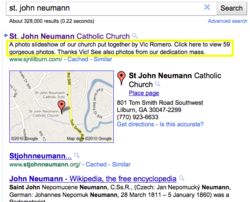
sjn-google-search-meta-prob.pngI am surprised how high our church website ranks on a google search when there are many other SJN churches and even a wikipedia entry for St. John Neumann. I even logged out of Google so it would not bias the results. I’ll give credit to the activity we have on the site with updates and cross-links to and from Facebook, YouTube, and Twitter.

I noticed the description for our site (the description meta tag on the home page) was not the default for the site, but instead one of the articles that appeared on the home page. (See yellow box in attached image.)

After a little digging, I found out that there was a bug in a plug-in I used to generate article meta description tags dynamically called autoMetaDescSEO. I started using this plug-in when we started using Facebook because a Facebook link will attempt to grab the page’s description, which at the time was just the default for the website.

So the plug-in helped grab some relevant text from the SJN website page links. What I did not realize is that a bug caused one of the articles on the front page to place a meta description tag there, above the site meta description.

Fortunately Dao by Design has repaired this problem with a newer and renamed version of the plug-in now called SimpleSEO (a much simpler name.) The new plug-in has an option to not have the front page meta description auto generated. Google’s robots should have our search result updated within 48 hours…

Zipper Repair and Rat Trap Racer

Ted told me that his zipper repair post was one of the top search results on Mac5 lately. I went and checked and for the month of October:

613 different keyphrases Search Percent
edxo-14 39 4.4 %
zipper repair kit walmart 28 3.2 %
mouse trap racer 23 2.6 %
model edxo-14 13 1.4 %
mouse trap racers 12 1.3 %
all barbies 8 0.9 %
rat trap racer 8 0.9 %
barbie over the years 6 0.6 %
versapak tools 6 0.6 %
wikipedia template convert 6 0.6 %
Other phrases 725 82.9 %

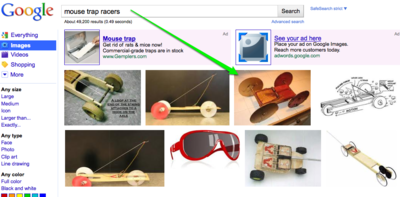
No surprise to find some of Ted’s flashlight models, but I was surprised to see that Danny’s Rat Trap Racer is being found. It turns out the photo of his racer is #3 on a google image search!

google-search-mouse-trap-racers.png

Barbie is still popular, although not what she once was.

Google Blue Triangle Arrow

google-blue-triangle-thumb.pngI noticed that Google now puts a little blue triangle / arrow next to the first entry of a search list. I wondered what good that was. Was it indicating the “best” find? I thought that is what the first position meant.
google-blue-triangle.pngSo I googled on “blue triangle arrow google” and found out. You can use your up and down arrow on your keyboard to move the triangle to another choice. Then you can press the enter key to go to that choice. So it is a way to choose a result without having to point and click.

In the snapshot attached, you can see where I’ve moved the arrow down one choice with my down arrow.

Now that I use a trackpad both on my laptop and at my desk, I don’t mind pointing and clicking so much, because I just gesture and tap.

m&m Gunk Rocks

When flying between meals, I’ll get a bag of peanut m&m’s in flight. Ever since Delta quit taking cash, I use my company card. My assistant asked me recently, “I’ve been meaning to ask you, what are these $2 fees Delta has started charging you. Is it for baggage?” I then confessed it was for m&m’s. She thought that was funny.

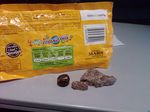
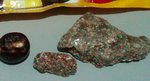
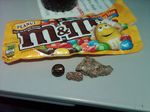
On my last trip, I was well through the bag when I spotted something at the bottom. It looked like a rock. Turns out there were two of these rocks and a really bad looking m&m. After determining the rocks were just gunks of smashed up m&m’s, I ate the rest of the contents. I have to admit, the final m&m’s did not taste as good since they had more “gunk dust” on them that the first m&m’s.

Thought I’d include the photos to share with Mars. The second one has a lot number they may find useful.

mm-gunk-rocks-closeup.jpg m-m-gunk-rock-20100915-1739.jpg m-m-gunk-rock-20100915-1740.jpg

Desktop Bocci

One of my favorite photos from Anna Maria 2010 is now among our iMac’s desktop rotation. (Desktop changes every hour randomly.)

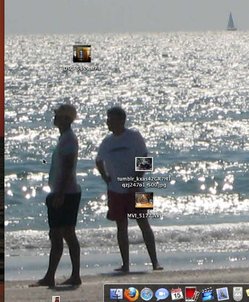
I often remote control our iMacs from my laptop when maintaining them. This snapshot is from my MacBook while controlling the iMac 20. That’s why you see little icons floating around Grant and Ted. You can just see my own desktop photo peeking through on the left. One of the sunset shots.

grant-and-ted-on-desktop.jpg

Bob Married Carol (Facebook)

I think it is funny when someone starts on facebook and their initial settings start getting established. Hence this “status change” that appeared for Bob.

bob-married-carol-facebook.jpg

Congratulations! About time you made an honest woman of her Bob!

Kroger Chip Rip

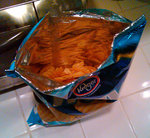
Opened a new package of Kroger brand chips. The bag was 1/3 chips and 2/3 air. That’s a 3/3 (total) rip off! Don’t buy Kroger chips!

kroger-chip-rip.jpg