 Some people leave their hearts in San Francisco. I left my cell phone in Chicago. I think it is in the back seat of an Avis van. It was a 3-year-old phone, and I was planning on getting a new one, so this forced the issue.
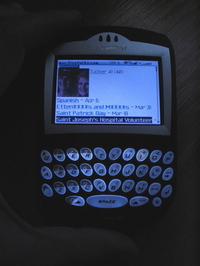
After two visits to the Verizon store and consulting with some IT folks at work, I ended up buying a BlackBerry 7250. It came bundled with a Bluetooth (wireless) Jabra BT350v Headset. The photo shows me holding the BlackBerry, browsing mac.five, scrolled down to Tucker. Hi Mom & Dad! The wireless headset means the BlackBerry can sit on the car seat, in my pocket, or in my backpack, and I can take and make calls while looking like someone off of StarTrek with a blinking blue ear. Oh boy.
I’ve been watching the wave at work of e-mail by phone. It reminds me of previous technology waves: pagers, e-mail, Apple Powerbooks, Dell laptops, Palm Pilots, cell phones, camera phones. When a few top executives get something, it rapidly spreads down the org chart. People are surprised, but I’m not an early adopter. The leading wave rarely has utility, and is mostly fueled by false hope that this new device is going to solve your communications problems. However, once a technology gets a foothold and spreads like kudzu, it is usually time to join in or be left out.
So I went looking for a phone that could do e-mail. That way I, too, can reply and forward e-mails on the go with very short messages like: “Look at this.” or “I agree.” I find most of the thumbed e-mails to add little value, but I suppose being able to read detail on the go is useful.
Waiting has paid off because the company is going to standardize on the Enterprise Blackberry Server. This gives a superior e-mail experience over the Palm / Treo solutions that have been adopted by the leading wave. The second wavers are all getting Blackberry phones. The leading wave will not care because it will be an excuse to get a newer thing.