
Modem Died

Yesterday Eric and I installed his wi-fi router instead of the one I had. His is newer and the range is supposed to be better, so it should reach to his room better than my router does. The DSL modem I have had been getting very temperamental lately, and if you moved it even a little, it would cut the power to it and then make it restart. After installing the new router, everything worked fine for a little while, but then the DSL connection was lost for some reason. I went to check on it and the modem started flashing all of its lights when I could even get a consistent power connection, which wasn’t that often. I ended up calling tech support and they said my modem was probably faulty. They would sell me a new modem for $75 plus $15 shipping. I said that was too expensive. They then tried to upsize me into a modem that also had wi-fi built in. I said no thanks and asked if I could buy a modem on my own. They said it was possible, but they wouldn’t support it. I really didn’t want to spend a lot of money because I don’t even know how long AT&T will continue DSL service before making people switch to U-verse.

I wanted to research modems, but I didn’t have internet, so that made it kind of difficult. Then I thought there must be a lot of people who have switched from AT&T or Bellsouth DSL to something else that probably have modems they aren’t using anymore. I wanted to post something on our neighborhood bulletin board. But, again, no internet. I even called the next door neighbors and asked if I could get the password to their wi-fi, which they gave me, but it was complicated and I never got it to work. So Eric and I head to Fry’s. We found a combination DSL modem and wi-fi router for about $90. We kept looking and found a DSL modem by D-Link for $50. Looking further, we found a DSL modem by TP-Link for $30, so I got that one. It was a third of the price of the one AT&T wanted to sell me and I would get it today.

I brought it home and it had some instructions for AT&T installation using an installer program. I had to run the installer from a mini CD-ROM which was a little complicated because my DVD drive wasn’t working. I think I had turned it off when I had power supply problems. But I turned it back on in the BIOS and it works fine. The installation was pretty straightforward. I gave it my username and password for AT&T service and I was on the internet pretty quickly. Then I just had to add Eric’s router between the modem and my computer and we were back up and running. Eric had me go to Speed Test to check how fast the connection was and he said it was significantly faster than the last time he measured it (I think it was about 1.2 megabits/sec download speed). Pretty good.
New Netbook

I have been looking around for a new laptop to replace the one I bought five years ago. I wanted a 14″ or 15″ screen, over 4 GB of memory, Intel’s new Haswell processor, and a 6-cell battery, which combined with the efficient Haswell, should give me a lot of run time from the battery. I found a really nice HP for $399 (recently $349) at Best Buy that had 4 GB of memory, but could be upgraded to 8 GB, but the HP has a 17-inch screen and weighed over 6 lbs, making it bulky and pretty heavy.

Office Depot had a little netbook type of thing, called an Asus Transformer T100. While it runs Windows 8.1, it has only 2 GB of memory, internal storage of only 32 GB, and has an Intel Atom processor. It has a small 10-inch screen, no DVD drive, and weighs just over 2 pounds. It has a Micro SD slot (no room for a full-size SD card) and I thought I could double the storage by getting a 32 GB card at Fry’s for $18. It even comes with a basic version of Microsoft Office, all for $329. The “Transformer” part comes in because you can remove the keyboard and have a touchscreen tablet. All the keyboard does is give you a USB 3.0 port (plus keyboard and touchpad). So I was deciding whether to go with the big 17″ laptop, the tiny netbook, or wait for a 15″ laptop like I wanted. I decided on getting the netbook thing. I liked the idea of an iPad size Windows computer. Maybe eventually I will get a bigger laptop as a replacement for my desktop computer.

I’m typing on the Transformer right now. I will post a review after I play around with it for a few days.

2014 Roth

I posted a comment as a follow-up to last year’s Roth IRA purchase. With the stock market up 30% in 2013, I am a little nervous about a correction in 2014, but one area that didn’t do well at all was emerging markets, which lost money, and international stocks in general didn’t do nearly as well as the US market. In 2003, I was going to sell the shares of Janus Overseas because of changes in management, but instead just sold half the shares and used the proceeds to buy shares in Fidelity Diversified International. From then on Janus outperformed Fidelity just about every year and I regretted the decision to reduce my position in Janus. Since the shares in FDIVX are the only ones I have left in my non-IRA Fidelity account, I thought I might sell that position and use it for my IRA purchase.
Continue reading “2014 Roth”

Desktop Repair

My desktop computer, a very old Dell Dimension 4700, bought in April 2005, has started having problems lately. Last year I had installed a new hard drive and rebuilt the operating system, which worked great for a while, but sometimes lately it wouldn’t start at all. Instead, while booting, it would click off and an orange light on the front would start flashing. I looked around on the internet and the light seemed to usually indicate a bad power supply. But it was an intermittent problem, so I opened the computer and tried blowing out a lot of dust and cleaning dust out of the vents and fans. Then it would work, but I would still have problems sometimes. If it did start up, it would usually stay on just fine. I even unhooked one of the two optical drives and one of the two hard drives, thinking I needed to reduce the power consumption.

By Friday I couldn’t boot up at all. I would get the orange light pretty early in the process no matter how much I cleaned it. I had never replaced a power supply before, but Eric said he had done it and it was pretty easy. Plus they are almost all the same. He wound up taking the power supply out of his computer so I could test a known good power supply in my computer. It booted up just fine with Eric’s power supply on Saturday, so that was definitely the problem. I took my power supply apart and blew some more dust out of it and then tried again, just to be sure, and it still didn’t work. Eric said a new power supply should be about $20 and I could get one from NewEgg.com. I looked around and you can get a power supply for anywhere from $13 to $160. They typical price seems to be around $40-60. The original power supply was only 305 watts, so I didn’t need a high power model. I looked at New Egg, Amazon, Office Depot, and Frys online, and decided to go to Frys so I could get one and have it this weekend. They had one for $25 before a $9 rebate. I probably spent another $5 in gas going up to Frys, but it was worth it to get it right away. The new power supply is much lighter than the old one, but fit perfectly and the computer is running like a champ. Due to the configuration of the cables on the power supply I wasn’t able to hook up both DVD drives, but that’s okay. And the new one is much louder than the old one as well.

I am still thinking I would like a new computer, but I’m waiting for a good price on a notebook that has the new 4th generation Intel processor (Haswell). My thought is the notebook will replace the desktop and laptop, so I also want it to support two monitors. The power consumption of desktop computers made me think they are no longer necessary.

New Counter and Sink

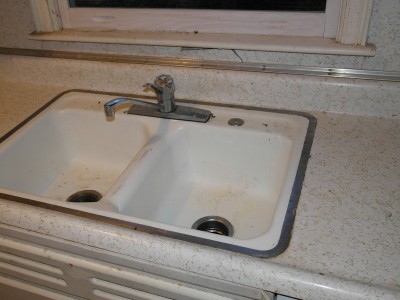
My kitchen has always needed some work. The green and white formica counters, the dripping faucet, the stained and cracked cast iron sink, the pink wallpaper, etc. I didn’t want to do a total renovation, but I figured I could update some parts. I went to Home Depot and talked to a kitchen designer and we charted out a makeover that would replace the counter, sink, faucet, flooring, and add a tile backsplash for about $2700. For the counter, the basic level is laminate or formica. Then there is a big jump in price to about 3 times that price where you can get granite, quartz, or Corian. I figured formica would be okay and less maintenance than granite. I picked out a Delta faucet that got good reviews and a thicker than average stainless steel sink from Kohler. One problem with the cast iron sink was that if I dropped a glass or dish in the sink, it was pretty much a gonner, but stainless is a little bouncier and hopefully will save some glassware. The same thinking was behind getting a vinyl floor instead of ceramic tile.

A few weeks ago, a guy came and measured for the counter and praised my choice of laminate over granite. He said the counter should be read “week after next” which would have been the week before last. The official estimate was 2-3 weeks. 3 weeks was last week. I was hoping they would install it on Columbus Day since I would be off anyway, but they sent me a notice saying it would be last Tuesday, the day after Columbus Day.

Old sink and counter
Continue reading “New Counter and Sink”