
Eric was moving all of his stuff out last weekend. I don’t think he realized how much stuff he had never taken back to his apartment, but he threw away or took almost all of it. He found his old laptop and a 2.5 inch hard drive that I said I could recycle next time I go to an electronics recycling day. After he left I opened up the laptop and there was a 120 GB solid state drive in there. So the 320 GB hard drive had probably been the laptop’s original hard drive and he had put the solid state drive in there to increase performance. I could sell the solid state drive. They seem to fetch $30-$40 on eBay, or I wondered if I could do the same with my old laptop that I am using as a desktop now. I had swapped in a 500 GB hard drive to get a couple of more years of life out of it, but after my desktop computer failed, I bought an external hard drive attached to my network, and the idea is that all computers will store their files in one place, on the external drive, so a large hard drive isn’t necessary in the laptop. I’m still working on a good way to back up that drive in case it fails, but I have quite a collection of portable drives that I could use. I recently got a 1 TB drive to use as the main backup. When I upgraded the old laptop I had bought a 500 GB portable drive and then took that drive out and put it in my laptop. So that enclosure had the old notebook drive in it for 250 GB of storage. It is pretty easy to take the drive out of the enclosure, so I tested Eric’s 320GB and 120GB drives in the enclosure and they both seemed to work fine. Because the laptop doesn’t work, I went ahead and formatted them both. All it seemed like I needed to was copy the 500 GB drive contents over to the SSD.
Continue reading “Old Hard Drive”
Category: Uncategorized
Fake Coin
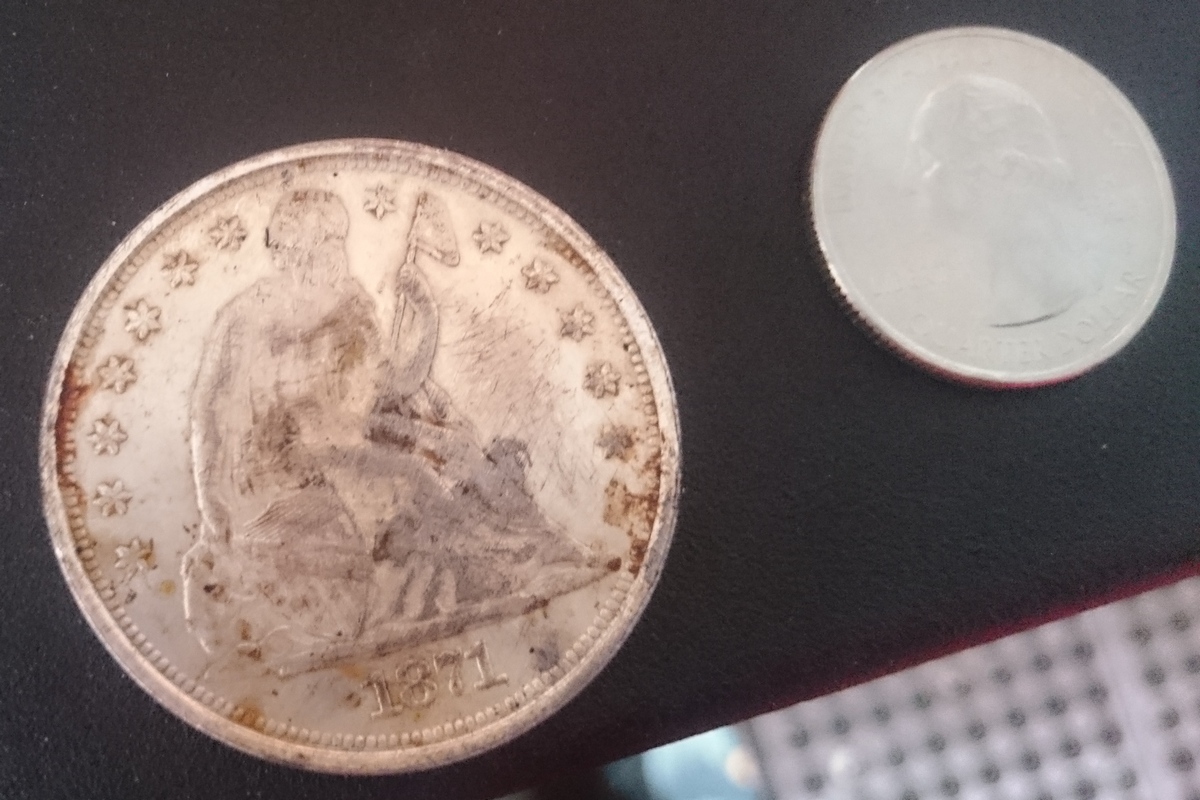
Yesterday Eric sent me a picture and said “What is this gigantic coin?” I saw the date of 1871 on it and looked up 1871 coins. I soon found a similar looking coin: the seated liberty dollar coin. In excellent condition it can be worth thousands of dollars, but even in average condition it can still be worth $200. Today he gave me the coin to look at and I quickly found out it was fake. The real coin should weigh 26.7 grams. I have a small digital scale and it said the coin only weighed 17.7 grams. I also measured the diameter, which seemed to be correct. As another test, I held a magnet up to it and it stuck. Silver dollars were made from 90% silver and 10% copper, neither of which will stick to a magnet. So it is definitely fake. I looked up fake seated liberty dollars on the internet and found a post by a guy who got one and he noticed that if you look at the coin and flip it vertically, the other side should also be right side up, but his fake was upside down. He said he called the mint and they said the reverse of all US coins should flip right side up. Eric’s coin was made the wrong way too. So it was pretty easy to figure out a fake. Really all it took was a magnet.
Comcast
In October I was nearing the end of my AT&T U-verse contract. I had upgraded my internet from DSL with them, getting bundling discounts by combining a horrible TV package that they basically paid me $5 per month to accept (non HD, not much more than local channels), but the deal also included HBO (including HBO Go online) and a year of Amazon Prime, which Eric has made good use of. The total cost was about $50 per month for 18 Mbps internet service (that was really in the low 20’s, so better than expected). When it came time to renew, I hoped to get internet only and hopefully get the price down a little, maybe to $40. But when I called them, they had no interest in giving me any kind of reasonable deal, and said internet only at that speed would be $60 per month. I told them to let my service stop at the end of the term. And they were fine with that.
Continue reading “Comcast”
Computer Problems
Right now I have a silly number of computers at home that I use. I have my new Dell Inspiron (2014) and the laptop that it replaced, the Dell Vostro, which still works fine (2008). Also I bought an Asus Transformer in 2014 which I don’t use that much because it is too small to use as a laptop and instead of design the interface for a 10″ screen, they just shrunk it, so it’s too tiny to read. Also I have my very old Dell Dimension 4700 desktop (2005) which I still use a lot when I want to do serious work since it has two monitors available and a full size clicky keyboard. That’s 4 Windows computers plus I still have the Nexus 7 tablet (2012) and the iPod (2015). The thing I don’t like about the desktop is that it is still running Windows XP, which is becoming a bigger problem (iTunes won’t run on it) and it uses a lot of energy, maybe about 200 watts if you include the monitor. Since I leave it on when I’m home, I can share its files and access them from anywhere in the house with the other computers though.
Continue reading “Computer Problems”
iPod Not Recognized
Apple released iOS 9 this week, so I was thinking I would need to sync with my computer to get the update. I don’t sync that often, so I hadn’t done it since I got the iPod back in July. Since then, I’ve upgraded that computer to Windows 10. Also there was a new version of iTunes to download, as always. The iPod upgraded to iOS 9 on its own, so that wasn’t a problem, but I still thought it would be good to do a sync. Kiwix (the Wikipedia app) was updated as well and now it crashed as soon as I opened it. Sometimes you can uninstall an app and then download it again to avoid crashes like that, but in this case, I would also need to download the 16 GB data file, which I didn’t really want to do.
Continue reading “iPod Not Recognized”