
Lexar vs. Kingston

A couple of weeks ago I went to Fry’s to buy a copy of Trend Micro Internet Security which would be free after two rebates. I really try not to buy anything else at Fry’s because if it isn’t on sale, it usually isn’t a good deal. However I have been looking to upgrade my Lexar Firefly jump drive that I raved about a couple of years ago. My rule is I don’t like to spend more than $10 on a thumb drive. They had a bin of Kingston Data Traveler 110 thumb drives with 2 GB of memory for only $9.99, so I bought one. That’s four times as much memory as the Firefly. It’s a decent drive, but bulky compared to the Firefly. The USB part slides out so it doesn’t need a cap, but it has to be connected to my keychain when I plug it in and it blocks adjacent USB drives due to the large size.
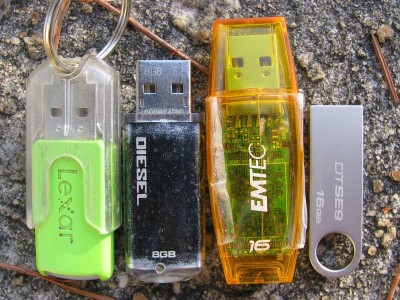
Naturally, the following weekend Fry’s advertised a 4 GB Firefly for less than $10 after rebate. I looked up the Firefly on Amazon and there were a lot of complaints about it being slow. If I was going to be moving 4 GB of data, I didn’t want that data to move slowly. So I decided to run a test. I moved a 344 MB video file (appropriately enough, an episode of the TV series Firefly) to the Firefly and timed how long it took: 129 seconds. Then I measured how long it took to copy the file back to my computer: 40 seconds. So the write speed was a lot slower than the read speed. Next I tried the Kingston drive and got 57 seconds for writing and 19 seconds for reading. That’s more than twice as fast. At work I have e-mail archives that are about 2 GB and I need to bring them home for a backup. That would be 12.5 minutes on a Firefly and only 5.5 minutes for the Kingston. That’s a big difference. It seems like these speeds should be posted somewhere. So here they are (in megabytes per second) [USBDview results in square brackets]:

Drive Write Read USBDview
Lexar Firefly 512 MB 2.67w 8.61r [ 2.39w 7.48r]
Kingston Data Traveler 110 2 GB 6.04w 18.12r
Corsair Flash Voyager 8 GB 5.17w 22.40r
60 GB Archos 0.98w 7.65r
20 GB HD Enclosure 7.83w 18.13r [11.29w 18.06r]
Microcenter 4 GB 3.51w 19.13r [ 2.80w 20.07r]
OCZ Diesel 8 GB 6.62w 19.13r [ 9.68w 17.56r]
Emtec C400 16 GB 9.83w 14.96r [ 9.14w 15.64r]
Kingston SE9 16 GB 6.43w 14.02r [ 6.43w 16.97r]
PNY Attache 4 32 GB 7.45w 27.81r [ 6.34w 25.82r]
Simpletech 320 GB hard drive 22.96w 22.96r [19.01w 31.82r]
32GB SanDisk removable

22.96w [10.81w 21.82r]

I decided that as much as I like the form factor of the Firefly, I didn’t want to wait so long and so I didn’t get the 4 GB model.

Austin’s E-Collar

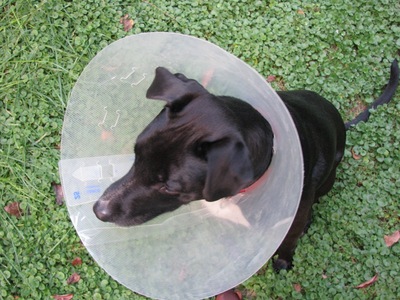
Austin had a growth removed from his backside last week. So that he won’t pull the stitches out, he has to wear an e-collar for 11 days. I already had one that I had gotten for Clio, but it was too hard for her to use, so I didn’t make her wear it. Thursday Austin had just come back from the vet and was pretty out of it from the anesthesia, so it wasn’t a big deal. Friday he kept running into things and would get the edge of the cone stuck on door jambs and just stop, waiting for me to get him unstuck. But by Saturday he was wandering around the house like a champ and avoiding (for the most part) running into things. By Saturday night, he actually broke it when I let him outside (I wasn’t supposed to let him out without a leash, but it was the middle of the night, so I just let him out; mistake). I was able to make repairs though and he wore it all day today while I was at work without a problem. I don’t make him wear it all the time, just when I can’t watch him and at night. The vet said a dog can pull the stitches out in a minute, so I don’t want to take any chances.

ecollar.jpg

He looks kind of miserable in the picture above, but he actually doesn’t mind. The cone attaches to his collar so when I take it off, he gets concerned, just like he does when I normally take his collar off. And then he wants it back on, just like normal. Wikipedia tells me that the E is short for Elizabethan since apparently Queen Elizabeth also could not be trusted not to pull her stitches out.

ecollar2.jpg

Gas Switch

I got a card in the mail from Georgia Natural Gas the other day saying I could switch to them and get natural gas for 99.9 cents per therm for 12 months. I found out that is only a temporary price for new customers and after 12 months it would go up to a more normal rate (though rates have dropped lately and currently the rate is 105.9 cents per therm). I visited Clark Howard’s website and saw an ad to get a $75 gift card from GNG for new customers, but at the 105.9 cent rate. Since I only use 400-500 therms in a year, this still represented some pretty good savings over current Walton EMC Natural Gas prices. However, the small print said the $75 gift card was available from May to December and only available to the first 500 customers. That’s not many.

I called the number (866-665-9464) and asked if that deal was still available. They asked what the promo code was and I gave it to them: GLOC-1-080-000. They said the gift card was still available and I would get it after November 1 when the switch took effect. Additionally they gave me the 99.9 cent rate and also waived the switching fee (I found out later you can switch once a year without a fee as long as you aren’t locked in). Also, this plan has a monthly fee of $3.99 instead of $5.75 at Walton. As long as competing prices elsewhere don’t fall below 85 cents, I should see some savings from this plan.